Case Study: Leading My Team's Strategic Move to Cloud Post-Production on Azure
Published on:
Summary
My video team faced mounting challenges with its on-premises post-production infrastructure, which hindered collaboration, limited scalability, and posed data management complexities. To address these issues, I architected the solution and partnered with our IT department to implement a comprehensive, cloud-native post-production environment on Microsoft Azure. The solution centralized the entire workflow, from archiving to 4K editing and motion design, within Azure's secure ecosystem. Despite initial challenges related to network constraints and workflow adaptation, the new pipeline has unlocked unprecedented collaborative capabilities, enhanced data security, and provided a scalable foundation for future growth. The project successfully transitioned my team to a flexible, resilient, and forward-thinking operational model.
My Role: Project Manager & Solution Architect
As the lead for this initiative, I was responsible for the project from conception to final adoption. My key contributions included:
- Vision & Architecture: I identified the need for a cloud-based workflow and designed the complete high-level solution, including the tiered storage strategy, virtual workstation requirements, and the secure connectivity model.
- Project Management: I served as the primary project manager, defining the technical requirements for our IT department and overseeing their implementation to ensure the final build met the creative team's functional and performance standards.
- Workflow Integration & Training: I designed the new proxy-based workflow and personally led all training and documentation efforts to ensure my team could successfully transition and thrive in the new environment.
The Challenge: Breaking Down On-Premises Silos
Before migrating to the cloud, the team's post-production workflow was tethered to physical workstations and portable hard-drives. This model presented several key obstacles:
- Collaboration Friction: Sharing large project files between editors and motion designers was slow and inefficient, often relying on transferring media between physical drives or navigating slow internal network shares.
- Lack of Flexibility: Team members needed to have physically access to the portable media source where the project existed to work. This became a significant bottleneck to business continuity when the team was traveling for work or working remotely.
- Project Handoffs: If a team member was unexpectedly out of office or traveling for work, handing off their project was a logistical nightmare, causing significant delays and potential version control issues.
- Data Security & Risk: The use of portable hard drives for sensitive company media created an unacceptable level of risk for data loss and security breaches.
- Inefficient Archiving and Retrieval: Completed projects and raw footage were archived on disparate physical hard drives, making retrieval for future use a time-consuming and manual process. There was no central, searchable, or scalable long-term repository.
- Hardware Management Overhead: The constant cycle of purchasing, maintaining, and upgrading expensive workstations and local storage was both costly and time-consuming for the video and IT departments.
"I was inspired to pursue a cloud-based solution years ago after seeing services like Renderro. I realized they were powerfully leveraging public cloud infrastructure like AWS, and I knew a similar model could solve our internal challenges by centralizing our resources and talent, regardless of location."
- Salvador Pantoja, Creative Video Producer & Operations Lead
The Solution: A Unified Post-Production Hub in Azure
My vision was to create a single, high-performance environment that could operate within our company's existing infrastructure. Our organization is standardized on Microsoft Azure, so I architected a solution that leveraged its most powerful services to meet the unique demands of a professional video workflow.
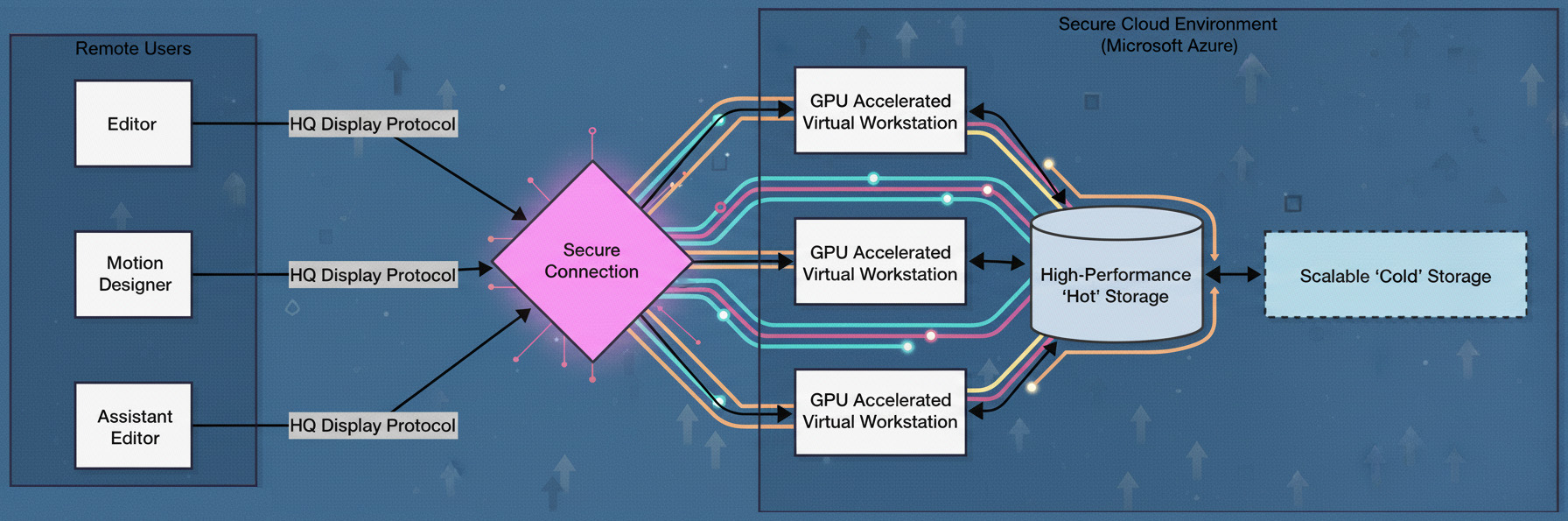
- High-Performance Compute: Working from my architectural design, our IT team deployed a pool of GPU-accelerated virtual machines, specifically chosen for their balance of processing power and graphics capabilities. These compute instances are critical for accelerating video rendering and providing a smooth user experience in demanding creative applications. Each virtual machine was equipped with high-speed solid-state drives to ensure fast boot and application load times.
- Centralized, Tiered Storage for Performance and Archiving:
The cornerstone of our collaborative workflow is a two-tiered cloud storage strategy.
- Active Project Storage: A tier of 'hot' high-performance, low-latency storage acts as a central, shared drive for all virtual workstations. All active 4K source media, proxy files, and project files reside here, making them instantly accessible for editing.
- Permanent Archival Storage: For long-term retention, the architecture includes a 'cold' storage solution. This provides a virtually limitless, cost-effective storage pool for all raw footage and completed projects.
- Seamless & Secure Connectivity: To ensure a high-fidelity, responsive remote desktop experience, we implemented a high-performance remote display protocol renowned for its color accuracy and low-latency performance. For security, all connections are routed through our mandatory corporate security protocols, ensuring all company data remains within our secure network perimeter.
Implementation & Overcoming Hurdles
The transition to a completely new infrastructure and workflow was not without its challenges. As project lead, I worked with both my creative team and our IT partners to address them methodically:
-
Challenge 1: Optimizing Network Performance:
- Issue: Our corporate security requirements necessitate routing all traffic through secure channels. A key challenge was configuring this environment to ensure a fluid, high-resolution media stream for my editors without compromising our security posture.
- Mitigation: I collaborated closely with our IT security team to test solutions and define best practices for my editors.
-
Challenge 2: The Mac-to-PC Platform Shift
- Issue: My video team has historically been Mac-based. The move to a Windows-based AVD environment required adaptation to a new operating system, keyboard shortcuts, and file path conventions.
- Mitigation: I conducted dedicated training sessions and created shared documentation for common workflow tasks. Since our primary toolset (Adobe Creative Cloud) is cross-platform, the core application experience remained consistent, which eased the transition.
-
Challenge 3: Optimizing Performance for 4K Footage
- Issue: I identified that editing native 4K MXF files directly on the virtual machines, while possible, did not provide the seamless, real-time experience my editors required.
- Solution: I implemented a proxy-based workflow, a standard industry best practice. The system I designed uses the virtual workstations to generate low-resolution proxy files from the 4K source material stored on the high-performance storage. Editors then use these lightweight proxies for a fluid, real-time editing experience.

Results & Key Benefits
Despite the initial hurdles, the Azure cloud pipeline has delivered transformative results:
- Unprecedented Collaboration: Project handoffs are now instantaneous. For example, when a lead editor was out sick, I was able to log into an available virtual workstation, open their exact Premiere Pro project from the shared storage, and continue their work within minutes.
- Enhanced Security and Centralized Control: All company assets and project data remain within our secure Azure environment. Media is never downloaded to local machines, drastically reducing the risk of data leaks and providing a clear chain of custody for all intellectual property.
- Operational Agility: We can now scale our resources on demand. If we need more editing stations for a large project, we can provision new virtual workstations far more quickly and cost-effectively than purchasing and setting up physical hardware.
- Cost as a Strategic Investment: While the monthly operational expenditure (OpEx) is a consideration, the company views it as a worthwhile investment. The cost is offset by the elimination of capital expenditure (CapEx) on hardware, reduced IT management overhead, and the immense value derived from superior security and collaborative efficiency.
Conclusion & Future Outlook
By moving our post-production pipeline to Microsoft Azure, my video team has successfully modernized its creative operations. We have built a secure, scalable, and highly collaborative environment that empowers my team to produce their best work from anywhere. This project has not only solved our immediate challenges but has also future-proofed our workflow, ensuring the video team can support the company's critical marketing and communication objectives with maximum speed, security, and efficiency, while effectively managing our growing library of digital assets for years to come.